27 enero 2013

Souvenir of Love


Supplies Needed:
Psp & Animation shop
Tube of choice. Art by Vika Misticheskaya, the tube is available here
Scrap kit Souvenirs of Paris (PTU) by Angelica Sellers here
Animation 174 by Simone here
Mask 28 by Trese here
Plugins:
Eye candy 4000
Xero here
Font here


Open a new image: 620x500

Open: paper01. c/p in the canvas.
Layers - Load/Save Mask - Load Mask from the disk:
Merge group. 

Open: element14. C/p in the canvas, resize at 70 percent - Smart Size.
Place it in the center. With the magic wand, click inside, expand the selection: 10 pixels.

Open: paper07. C/p in the canvas, resize at 50 percent - Smart Size.
Place it below the frame. Selections - Invert. Edit - Clear. Selections - Invert. 

Open the close up of the tube, c/p in the canvas, place it in the right side of the frame.
Selections - Invert. Edit - Clear. Selections - Invert. Colorize to black and white.

Effects - Plugins - Xero - Illustrator:

Deselect. 
Open: element03. C/p in the canvas, resize at 50 percent - Smart Size.
Place it at the bottom of the tube. In the layer palette change the blend mode to: Difference.

Open: element13. C/p in the canvas, resize at 65 percent - Smart Size.
Place it above the tube and below the frame.

Open: element21. C/p in the canvas, resize at 70 percent - Smart Size.
Place it above the mask layer, at the top center.

Open: element56. C/p in the canvas, resize at 50 percent - Smart Size.
Place it at the right top corner of the frame, move the layer above the mask.
Duplicate. Image - Mirror. Image - Flip.

Open: element69. C/p in the canvas, resize at 45 percent - Smart Size.
Place it at the right top, above the leaves.

Open: element59. C/p in the canvas, resize at 40 percent - Smart Size.
Image - Mirror. Place it in the left top.

Open: element43. C/p in the canvas, resize at 35 percent - Smart Size.
Image - Mirror. Image - Rotate: Free Rotate: Left - 20 degrees.
Place it in the right corner of the frame.

Open: element70. C/p in the canvas, resize at 40 percent - Smart Size.
Place it in the top center.

Open: element11. C/p in the canvas, resize at 40 percent - Smart Size.
Place it in the right top.

Open: element09. C/p in the canvas, resize at 45 percent - Smart Size.
Place it in the right top, above the ribbon.

Open: element37. C/p in the canvas, resize at 40 percent - Smart Size.
Place it in the right top next to the queen.

Open: element65. C/p in the canvas, resize at 45 percent - Smart Size. Twice
Place it in right top corner, below the queen.

Open: element47. C/p in the canvas, resize at 45 percent - Smart Size. Twice
Place it in next to the diamond.

Open: element38. C/p in the canvas, resize at 40 percent - Smart Size. 
Place it in front of the rose and diamond.

Open: element48. C/p in the canvas, resize at 40 percent - Smart Size. 
Place it in the bottom center.

Open: element74. C/p in the canvas, resize at 40 percent - Smart Size. Twice.
Place it in the left corner of the black tag.

Sharpen the elements and apply shadow.

Effects - Plugins - Eye Candy 4000 - Shadowlab:

Open the tube, c/p in the canvas, resize if it's needed. Place it in the left side of the tag.
Effects - Plugins - Eye Candy 4000 - Shadowlab:


Add the name and copyright info.

To animate:
Copy merged the tag, open animation shop and paste as a new animation.
Duplicate until you have 23 frames. Activate the first frame and select all.

Open: SimoneAni174-mng.mng
Animation - Cull Animation: Remove 1 frame every 2 frames.
Activate the first frame and select all, drag the animation to the tag and place it in the right corner, above the butterflie.

**Adding a background to the transparent animation.

Animation - Animation Properties
Change the black color for the color of your choice, mine is white:

Apply and the color will be applied in all the frames selected.

Change the speed to: 13, play the animation and save if you like! :)

Beach Love


Supplies Needed:
Psp & Animation shop
Tube of choice. Art by SkyScraps, find the tube here
Scrap kit Abby Love (PTU) by Bibis Collections here
Animation Whitehearts by Lovey here
Mask 2 by Gems here
Plugins:
Eye candy 4000
Font here


Open a new image: 600x500

Open: BIBIABBYLOVE PAPERS (5). C/p in the canvas, resize at 80 percent - Smart Size.
Layers - Load/Save Mask - Load Mask from the disk:

Merge group.  Duplicate. Merge visble.

Open:  BIBIABBYLOVE ELEMENTS (88). C/p in the canvas, place it in the center.
With the magic wand, click inside, expand the selection: 10 pixels.

Open: BIBIABBYLOVE PAPERS (6). C/p in the canvas, resize at 50 percent - Smart Size.
Place it below the frame. Selections - Invert. Edit - Clear. Selections - Invert. 

Open the close up of the tube, c/p in the canvas, place it in the left side of the frame.
Selections - Invert. Edit - Clear. Deselect.
Effects - Plugins - Eye Candy 4000 - Shadowlab:

Activate the frame layer.
Open: BIBIABBYLOVE ELEMENTS (60). C/p in the canvas, resize at 50 percent - Smart Size.
Place it in the left side of the frame.

Open: BIBIABBYLOVE ELEMENTS (80). C/p in the canvas, resize at 90 percent - Smart Size.
Image - Free Rotate: Right - 15 degrees. Place it in the left bottom corner of the frame.

Open: BIBIABBYLOVE ELEMENTS (72). C/p in the canvas, resize at 30 percent - Smart Size.
Place it in the bottom left, above the leaves.

Open: BIBIABBYLOVE ELEMENTS (84). C/p in the canvas, resize at 40 percent - Smart Size.
Image - Flip. Place it in the bottom left.

Open: BIBIABBYLOVE ELEMENTS (86).  C/p in the canvas, resize at 50 percent - Smart Size.
Place it in the bottom of the seashell.

Open: BIBIABBYLOVE ELEMENTS (83). C/p in the canvas, resize at 50 percent - Smart Size.
Place it in the bottom left. 

Open: BIBIABBYLOVE ELEMENTS (79). C/p in the canvas, resize at 40 percent - Smart Size.
Place it in the center of the flower.

Open: BIBIABBYLOVE ELEMENTS (90). C/p in the canvas, resize at 40 percent - Smart Size.
Place it at the bottom of the flower.

Open: BIBIABBYLOVE ELEMENTS (7).  C/p in the canvas, resize at 25 percent - Smart Size.
Place it at the bottom next to the envelope.

Open: BIBIABBYLOVE ELEMENTS (51).   C/p in the canvas, resize at 25 percent - Smart Size.
Place it at the bottom left corner.

Open: BIBIABBYLOVE ELEMENTS (49). C/p in the canvas, resize at 35 percent - Smart Size.
Place it at the bottom between the envelope and the seashell.

Open: BIBIABBYLOVE ELEMENTS (39). C/p in the canvas, resize at 40 percent - Smart Size.
Place it at the left side.

Open: BIBIABBYLOVE ELEMENTS (77). C/p in the canvas, resize at 70 percent - Smart Size.
Place it at the right side.

Sharpen the elements and apply shadow.

Effects - Plugins - Eye Candy 4000 - Shadowlab:

Add the name and copyright info.

To animate:
Copy merged the tag, open animation shop and paste as a new animation.
Duplicate until you have 14 frames. Activate the first frame and select all.

Open: whiteheartsMNG-lovey.mng
Animation - Cull Animation: Remove 1 frame every 3 frames.
Activate the first frame and select all. Drag the animation and place it in the left side, above the elements. 

**Adding a background to the transparent animation.

Animation - Animation Propieties
Change the black color for the color of your choice, mine is white:

Apply and the color will be applied in all the frames selected.

Change the speed to: 12, play the animation and save if you like! :)

25 enero 2013

Best Friends


Supplies Needed:
Psp & Animation shop
Tube of choice. Art by Chiichanny, the tube is available here
Scrap kit Eva (PTU) by A SkyScraps here
Animation 69 by Simone here
Plugins:
Eye candy 4000
Penta .com 
Xero here
Font here


Open a new image: 650x500 pixels.

Open: SkyScraps-Eva-E21.  C/p in the canvas, resize at 65 percent - Smart Size.
Place it in the center.

Open: SkyScraps-Eva-E35. C/p in the canvas, resize at 50 percent - Smart Size.
Place it in the left side. Duplicate. Image - Mirror. Merge visible.

Open the close up of the tube, c/p in the canvas and place it in the right side.
Duplicate. Image - Mirror. Merge down the close up layers.

Activate the background layer. Selections - All. Float - Defloat.
Selections - Modify - Contract by: 15 pixels. 
Selections - Modify - Feather by: 25 pixels.

Activate the close up layer. Selections - Invert. Edit - Clear. Deselect.
Effects - Plugins - Xero - Radiance: 

Effects - Texture Effects - Blinds:

Effects - Plugins - Penta .com - Jeans:

Open: SkyScraps-Eva-E32. C/p in the canvas, place it at the bottom.

Open: SkyScraps-Eva-E28. C/p in the canvas, resize at 45 percent - Smart Size.
Place it in the left side of the background. Duplicate. Image - Mirror.

Open: SkyScraps-Eva-E5. C/p in the canvas, resize at 35 percent - Smart Size.
Image - Flip. Place it in the top right of the background. Duplicate. Image - Mirror.

Open: SkyScraps-Eva-E29. C/p in the canvas, resize at 35 percent - Smart Size. Twice.
Place it in the left, above the purple leaves. Duplicate. Image - Mirror, arrange it.

Open:  C/p in the canvas, resize at 40 percent - Smart Size. Twice.
Place it in the left, above the first flowe. Duplicate. Image - Mirror, arrange it.

Open: SkyScraps-Eva-E4. C/p in the canvas, resize at 40 percent - Smart Size.
Place it in the right above the flowers. Duplicate. Image - Mirror.

Open: SkyScraps-Eva-E45. C/p in the canvas, resize at 55 percent - Smart Size.
Place it in the left side, move the layer below the purple leaves. Duplicate. Image - Mirror.

Open: SkyScraps-Eva-E18. C/p in the canvas, resize at 50 percent - Smart Size.
Place it in the left bottom side.

Open: SkyScraps-Eva-E47. C/p in the canvas, resize at 45 percent - Smart Size. Twice.
Place it in the left side, next tot the rose.

Open: SkyScraps-Eva-E23.  C/p in the canvas, resize at 70 percent - Smart Size. 
Place it at the middle left. Duplicate. Image - Mirror. Image - Flip.

Open: SkyScraps-Eva-E26. C/p in the canvas, resize at 50 percent - Smart Size.
Place it in the right side, in the middle. Duplicate. Image - Mirror. 

Open the tube, c/p in the canvas and place it in the middle. Resize if it's needed.
Effects - Plugins - Eye Candy 4000 - Shadowlab:


Open: SkyScraps-Eva-E24. C/p in the canvas, resize at 40 percent - Smart Size.
Place it at the right bottom side, above the flowers.

Open: SkyScraps-Eva-E1. C/p in the canvas, resize at 55 percent - Smart Size. Twice.
Place it at the right bottom side, in the corner of the flowers.

Open: SkyScraps-Eva-E36. C/p in the canvas, resize at 70 percent - Smart Size.
Place it at the bottom center.

Sharpen the elements and apply shadow.

Effects - Plugins - Eye Candy 4000 - Shadowlab:

Add the name and copyright info.

To animate:

Close all the layers above the tube and the tube layer included.
Merge visible the open layers and rename it: 1.

Copy merged, open animation shop and paste as a new animation.
Duplicate until you have 18 frames. Activate the first frame and select all.

Open: SimoneAni69-WhiteSparklesUpandDown.psd
Animation - Cull Animation: Remove 1 frame every 3 frames.
Activate the first frame and select all, drag the animation to the tag and place it in the bottom center.

Back to psp, close the layer: 1. Open the closed layers, copy merged.
In animation shop: shop and paste as a new animation.
Duplicate until you have 18 frames.

Drag into the tag and place it where it belongs

**Adding a background to the transparent animation.

Animation - Animation Propieties
Change the black color for the color of your choice, mine is white:

Apply and the color will be applied in all the frames selected.

Change the speed to: 11, play the animation and save if you like! :)

Freebie Clusters: Rock Hard


ღ Freebies 2 Cluster frames

ღ Scrap Rock Hard (PTU) by Inzpired Creationz: here

ღ PSP and PSD files.

DOWNLOAD HERE OPTION1 OPTION2

DOWNLOAD HERE OPTION1 OPTION2

24 enero 2013

Rockin' the city


Supplies Needed:
Psp & Animation shop
Tube of choice. Art by Celine Pinup the tube is available here
Scrap kit Rock Angel (PTU) by Designs by Joan here
Animation starspinner by Lovey here
Mask 363 by Vix here
Plugins:
Eye candy 4000
Font here


Open a new image: 620x620.

Open the paper: paper 2. C/p in the canvas.
Open: RockAngel-1.  C/p in the canvas and place it in the middle of the paper, add shadow and merge visible.

Layers - Load/Save Mask - Load Mask from the disk:

Merge group. 

Open: RockAngel14. C/p in the canvas and place it in the center.

Open: RockAngel75. C/p in the canvas and place it in the bottom center.

Open the tube, c/p in the canvas. Place it in the center.
Effects - Plugins - Eye Candy 4000 - Shadowlab:

Open: RockAngel28. C/p in the canvas, resize at 70 percent - Smart Size.
Place it in the left bottom side.

Open: RockAngel82. C/p in the canvas, resize at 50 percent - Smart Size.
Place it in the left bottom, behind the guitar.

Open: RockAngel-4. C/p in the canvas, resize at 40 percent - Smart Size.
Place it in the bottom center.

Open: RockAngel-3. C/p in the canvas, resize at 45 percent - Smart Size.
Place it in the left bottom, behind the skull.

Open: RockAngel85. C/p in the canvas, resize at 30 percent - Smart Size.
Place it in the bottom, next to the skull.

Open: RockAngel105. C/p in the canvas, resize at 30 percent - Smart Size.
Place it in the bottom, next to the rose.

Open: RockAngel16. C/p in the canvas, resize at 45 percent - Smart Size.
Place it in the bottom, next to the stud bracelet.

Open: RockAngel81. C/p in the canvas, resize at 45 percent - Smart Size.
Image - Mirror. Place it in the right bottom corner.

Open: RockAngel81. C/p in the canvas, resize at 40 percent - Smart Size.
Place it in the right bottom corner, behind the boot.

Open: RockAngel42.  C/p in the canvas, resize at 30 percent - Smart Size.
Place it in the right bottom next to the guitar pick.

Open: RockAngel107. C/p in the canvas, resize at 40 percent - Smart Size.
Place it in the left bottom, move the layer behind the speakers.

Activate the top layer.

Open: RockAngel70. C/p in the canvas, resize at 45 percent - Smart Size.
Place it in the middle left side. Duplicate. Image - Mirror.

Open: RockAngel92. C/p in the canvas, resize at 65 percent - Smart Size.
Place it in the top left.

Open: RockAngel-5. C/p in the canvas, resize at 30 percent - Smart Size.
Place it in the top right.

Open: RockAngel116. C/p in the canvas, resize at 30 percent - Smart Size.
Place it in the middle right side.

Open: RockAngel73. C/p in the canvas, resize at 50 percent - Smart Size.
Place it at the bottom, above the elements.

Open: RockAngel86. C/p in the canvas, resize at 50 percent - Smart Size.
Place it in the bottom left. Duplicate. Image - Mirror. Image - Flip.
Move the layer above the speakers.

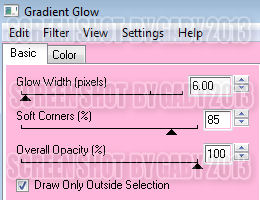
Effects - Plugins - Eye Candy 4000 - Gradient Glow:


Sharpen the elements and apply shadow.

Effects - Plugins - Eye Candy 4000 - Shadowlab:

Add the name and copyright info.

To animate:

Close all the layers below the tube: mask, speakers, elements, etc.
Merge visible all the open layers. Rename it: 1. Close the merged layer.

Open the rest of the layers and activate the layer with the white circle (RockAngel14).
Adjust - Add/ Remove Noise: Add Noise:
Uniform
30 percent
Monochrome

Copy Merged. Open animation shop, paste as a new animation.
Back to psp, undo the effect and apply again and change the percent to: 39.
Copy merged, in animation shop, paster after current frame. Repeat once more and change the percent to: 34.
Activate the first frame, select all. Copy, click in the last frame and paste after current frame.
Continue until you have 15 frames. Activate the first frame, select all. 

Open: starspinner-madebylovey'11.mng
Drag into the tag and place it in the left top part of the white circle. Undo the drag and place it again but now
in the center right, above the buldings, play the animation if you like, leave it.

Back to psp. Open the layer: 1, copy and paste as a new animation in animation shop.
Duplicate until you have 15 frames.

Activate the first frame, select all. Place it where it belongs to finish the tag.

**Adding a background to the transparent animation.

Animation - Animation Properties
Change the black color for the color of your choice, mine is white:

Apply and the color will be applied in all the frames selected.

Change the speed to: 13, play the animation and save if you like! :)

Love me


Supplies Needed:
Psp & Animation shop
Tube of choice. Art by Anna Liwanag the tube is available here
Scrap kit Purple Dreams (PTU) by Bibis Collections here
Animation 3flash and Bling 4 here
Mask 0008 by Trese here
Plugins:
Eye candy 4000
Xero: Radiance and Porcelain here
Font here


Open a new image: 620x550

Open: BIBIPURPLEDREAM PAPER (19). C/p in the canvas.
Layers - Load/Save Mask - Load Mask from the disk:

Merge group. 

Open: BIBIPURPLEDREAM ELEM (14). C/p in the canvas, place it in the center.
With the magic wand click outside the frame and expand the selection by 2 pixels.

Open: BIBIPURPLEDREAM PAPER (2). C/p in the canvas, resize at 65 percent - Smart Size.
Move the layer below the frame.

Open: BIBIPURPLEDREAM ELEM (64). C/p in the canvas, resize at 60 percent - Smart Size.
Place it in the top part of the frame. Selections - Invert. Edit - Clear. Deselect.

With the magic wand click inside the frame. Expand by 4 pixels.
Open the tube or close up, c/p in the canvas, place it in the left side.
Selections - Invert. Edit - Clear. Deselect

Effects - Plugins - Xero - Porcelain:

In the layer palette change the blend mode to: luminance.

Open: BIBIPURPLEDREAM ELEM (5).C/p in the canvas, place it in the left side between the wordart and the paper layer.

Open: BIBIPURPLEDREAM ELEM (59). C/p in the canvas, resize at 90 percent - Smart Size.
Place it in the top part of the frame, above the wordart layer.

Open: BIBIPURPLEDREAM ELEM (38). C/p in the canvas, resize at 70 percent - Smart Size.
Place it in the top part of the frame, above the first circles.

Open: BIBIPURPLEDREAM ELEM (60). C/p in the canvas, resize at 50 percent - Smart Size.
Place it in the top left of the frame. Duplicate. Image - Mirror. Image - Flip.

Open: BIBIPURPLEDREAM ELEM (48). C/p in the canvas, resize at 45 percent - Smart Size.
Image - Mirror. Place it at the bottom right of the frame, next to the purple flowers.
Duplicate. Image - Flip. Arrange it in the top left. Move the layer below the purple flowers.

Open: BIBIPURPLEDREAM ELEM (52). C/p in the canvas, resize at 50 percent - Smart Size. Twice
Place it in the top left, in the middle of the white and purple flowers.

Open: BIBIPURPLEDREAM ELEM (47). C/p in the canvas, resize at 40 percent - Smart Size. Twice
Place it in the top left, near the center.

Open: BIBIPURPLEDREAM ELEM (51). C/p in the canvas, resize at 45 percent - Smart Size. Twice
Place it in the top left, next to the white flower. Duplicate and place it in the bottom right.

Open: BIBIPURPLEDREAM ELEM (10). C/p in the canvas, resize at 35 percent - Smart Size. Twice
Place it in the bottom right next to the single purple flower.

Open: BIBIPURPLEDREAM ELEM (8). C/p in the canvas, resize at 45 percent - Smart Size. 
Place it in the right bottom corner, behind the flower layers.

Open: BIBIPURPLEDREAM ELEM (67). C/p in the canvas, resize at 40 percent - Smart Size.
Place it in front of the box.

Open: BIBIPURPLEDREAM ELEM (34). C/p in the canvas, resize at 30 percent - Smart Size.
Place it at the bottom right, in front of the white leave.

Open: BIBIPURPLEDREAM ELEM (81). C/p in the canvas, resize at 35 percent - Smart Size.
Image - Rotate: Free Rotate: Right - 85 degrees.  Place it at the bottom right, across the box.

Open: BIBIPURPLEDREAM ELEM (54). C/p in the canvas, resize at 45 percent - Smart Size.
Place it in the bottom left corner of the frame. Duplicate. Resize at 85 percent. Move it a lilttle to the right side.

Open: BIBIPURPLEDREAM ELEM (56). C/p in the canvas, resize at 40 percent - Smart Size.
Place it at the bottom left side of the frame, behind the pillows.

Open: BIBIPURPLEDREAM ELEM (91). C/p in the canvas, resize at 60 percent - Smart Size.
Place it above the big pillow.

Open: BIBIPURPLEDREAM ELEM (53). C/p in the canvas, resize at 45 percent - Smart Size. Twice
Place it next to the letter.

Open: BIBIPURPLEDREAM ELEM (50). C/p in the canvas, resize at 30 percent - Smart Size.
Image - Rotate: Free Rotate: Right - 90 degrees.  Place it at the bottom of the letter.

Sharpen the elements and apply shadow.

Effects - Plugins - Eye Candy 4000 - Shadowlab:

Add the name and copyright info.

Effects - Plugins - Xero - Radiance:

To animate:

Copy merged the tag. Duplicate until you have 18 frames.

Open: 3Flash-madebylovey'11.mng
Animation - Resize: 70 percent - Bicubic. Activate the first frame and select all.

Drag the animation to the left top part of the tag and place it above the flowers.

Open: Bling-4-Lovey'12.psd. Delete the last frame.
Animation - Resize: 80 percent - Bicubic. 
Activate the first frame and select all. 
Drag into the tag and place it starting in the right middle side.

**Adding a background to the transparent animation.

Animation - Animation Propieties
Change the black color for the color of your choice, mine is white:

Apply and the color will be applied in all the frames selected.

Change the speed to: 12, play the animation and save if you like! :)


23 enero 2013

Sweet Hottie


Supplies Needed:
Psp & Animation Shop
Tube of choice. Art by Barbara Jensen, tube available here
Scrap kit Pinkalicious (PTU) by Sky Scraps here
Animation 101 and 113 by Simone here
Mask 190 by Gems here
Plugins:
Eye candy 4000
Font here


Open a new image: 620x600
Open the paper: SkyScraps-PP3, c/p in the canvas.
Layers - Load/Save Mask - Load Mask from the disk:

Merge group. Resize at 95 percent - Smart Size.  Duplicate. Merge visible

Open: SkyScraps-E84. c/p in the canvas and place it in the center.

Open: SkyScraps-E91. C/p in the canvas, resize at 70 percent - Smart Size. 
Place it in the top left of the mask

Open: SkyScraps-E63.  C/p in the canvas, resize at 50 percent - Smart Size. 
Place it in the top left in front of the stars.

Open: SkyScraps-E67. C/p in the canvas, resize at 70 percent - Smart Size. 
Place it in the right side of the image. With the magic wand click outside.
Selections - Invert. Selections - Modify - Contract: 3 pixels.

Open:  the paper: SkyScraps-PP6, c/p in the canvas. Move the layer below the frame.
Selections - Invert. Edit - Clear. Deselect.

Open: SkyScraps-E26. C/p in the canvas, resize at 60 percent - Smart Size. 
Place it in the left side next to the windows.

Open: SkyScraps-E92. C/p in the canvas, resize at 55 percent - Smart Size. Twice
Place it in the top of the windows.

Open: SkyScraps-E64. C/p in the canvas, resize at 50 percent - Smart Size. 
Place it in behind the disco ball.

Open: SkyScraps-E65. C/p in the canvas, resize at 60 percent - Smart Size.
Place it in the bottom right corner of the windows.

Open: SkyScraps-E76.  C/p in the canvas. Image - Mirror.
Place it in the right corner, above the windows.

Open the tube, c/p in the canvas and place it in the center, between the eiffel tower and the windows.
Effects - Plugins - Eye Candy 4000 - Shadowlab:

Open: SkyScraps-E94.  C/p in the canvas, resize at 45 percent - Smart Size. 
Place it at the bottom right. Duplicate. Image - Mirror.

Open: SkyScraps-E88. C/p in the canvas, resize at 40 percent - Smart Size. 
Place it at the bottom left side.

Open: SkyScraps-E8 copie. C/p in the canvas, resize at 50 percent - Smart Size. 
Place it at the bottom left, behind the champagne bottle.

Open: SkyScraps-E20. C/p in the canvas, resize at 30 percent - Smart Size. 
Place it at the bottom next to the champagne bottle.

Open: SkyScraps-E87. C/p in the canvas, resize at 50 percent - Smart Size. Twice.
Place it at the bottom in front of the diamond heart.

Open: SkyScraps-E16. C/p in the canvas, resize at 50 percent - Smart Size. Twice.
Place it at the bottom next to the diamond heart.

Open: SkyScraps-E15. C/p in the canvas, resize at 45 percent - Smart Size. Twice.
Place it at the bottom in front of the envelope.

Open: SkyScraps-E14. C/p in the canvas, resize at 50 percent - Smart Size. Twice.
Place it at the bottom next to the envelope.

Open: SkyScraps-E19. C/p in the canvas, resize at 45 percent - Smart Size. Twice.
Place it at the bottom next to the shoe.

Open: SkyScraps-E81. C/p in the canvas, place it next to the cupcake, in the right side.

Open: SkyScraps-E58. C/p in the canvas, resize at 40 percent - Smart Size.
Place it in the right side.

Open: SkyScraps-E60. C/p in the canvas, resize at 35 percent - Smart Size.
Place it at the bottom of the duck.

Open: SkyScraps-E61. C/p in the canvas, resize at 40 percent - Smart Size.
Image - Rotate: Free Rotate: Left - 80 degrees. Place it at the bottom right.

Open: SkyScraps-E100. C/p in the canvas, resize at 45 percent - Smart Size. Twice
Place it in the middle of the handcuffs.

Open: SkyScraps-E10. C/p in the canvas, resize at 55 percent - Smart Size. 
Place it in the right bottom corner.

Open: SkyScraps-E13. C/p in the canvas, resize at 30 percent - Smart Size.
Image - Rotate: Free Rotate: Right - 20 degrees. 
Place it in the right side, behind the chocolate box.

Open: SkyScraps-E6. C/p in the canvas, resize at 45 percent - Smart Size.
Image - Rotate: Free Rotate: left - 15 degrees. 
Place it in the right side, next to the lollipop.

Open: SkyScraps-E65. C/p in the canvas, resize at 60 percent - Smart Size.
Place it in the bottom right corner of the windows.

Open: SkyScraps-E96. C/p in the canvas, resize at 50 percent - Smart Size.
Place it in the bottom left, above the elments. Duplicate. Image - Mirror.

Open: SkyScraps-E30. C/p in the canvas, resize at 60 percent - Smart Size.
Place it in the bottom left, above the elments. Duplicate. Image - Mirror.

Sharpen the elements and apply shadow.

Effects - Plugins - Eye Candy 4000 - Shadowlab:

Add the name and copyright info.

To animate:
Copy merged the tag, open animation shop and paste as a new animation.
Duplicate until you have 17 frames. Activate the first frame and select all.

Open: SimoneAni-101-ButterfliesAndBugs.mng
Animation - Cull Animation: Remove 1 frame every 2 frames.
Activate the first frame and select all, drag the animation to the tag and place it in the bottom center of the tube.

Open: SimoneAni113-Flare-MNG.mng
Animation - Cull Animation: Remove 1 frame every 3 frames. Delete the last frame.
Activate the first frame and select all, drag the animation to the tag 
and place it twice in the bottom side of the tag.

**Adding a background to the transparent animation.

Animation - Animation Propieties
Change the black color for the color of your choice, mine is white:

Apply and the color will be applied in all the frames selected.

Change the speed to: 12, play the animation and save if you like! :)

Animation - Cull Animation: Remove 1 frame every 2 frames.